Showing posts with label teaching. Show all posts

Tuesday, December 2, 2008

Links for teachers

Biology: what glowing hamsters can teach us about genetics (video of animals bio-engineered); reprints of antique medical illustrations - cross reference with cool art; European Molecular biology lab creates 3-D digital embryos - kinda like Google Earth on a REALLY small scale.

Psychology: - study shows cognitive therapy is as good as antidepressants; study looks at why failure inspires some and demoralizes others; book review - The Time Paradox, re: how individuals think of time shapes personality; Brain science - the source of genius;
image from http://neatorama.cachefly.net/images/2008-01/homer-simpson-brain-mri.jpg

Wednesday, November 12, 2008

Preparing to teach: tips and ideas for the first day

Tomorrow (Nov. 13, 2008 at 12:30 in PDR) Cindy Otts will be facilitating a Dine & Design workshop on "Tips and ideas for the first day." Please RSVP to Ben Hayes if you plan to attend.

This dovetails nicely with Janet Velazquez' Academic Symposium yesterday on What the Best Teachers Do. A big part of Janet's presentation talked about preparation and touched on ideas such as:
  • making promises rather than expectations,
  • framing the big provocative question that guides the inquiry of the class
  • figuring out what students know and understand, and
  • creating an environment conducive to learning
This also connects to Tips Ben has circulated re participatory lectures (particularly the idea of framing the big question). Ben has also shared the Hawaii Community College system links which have loads of Tips on many teaching concerns including the first day.

Cindy's workshop will be collaborative. Consider checking out the first KCKCC wiki, where we collected icebreakers from our faculty - to build community, establish trust and start class off. But NOTE: Icebreakers and community building isn't just for the first week or two; like all relationships, classroom dynamics require maintenance.

Monday, September 22, 2008

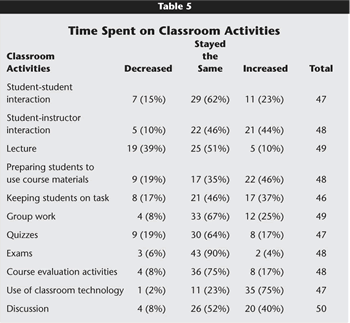
The Effect of Web-enhancement on Classes – Quantitative Research.

An article by Wingard (2004) ,
Classroom Teaching Changes in Web-Ehanced Courses,
"assessed the kinds of changes that occur in face-to-face instruction when faculty add Web enhancements to their course. "

It comes up with some expected and unexpected results. The affected faculty expected the following:
  • more efficient face-to-face interactions, better class discussions
  • more active learning,
  • less lecture
  • more readily available practice and feedback opportunities for students, and
  • more student-centered instruction.
That was essentially the case; moreover, “an unanticipated consequence of continual and comprehensive student access to course materials and resources was an elevation of faculty's expectations for students" [emphasis mine].

Where change was noted it was much more likely to be positive.

Source: Educause. Follow link in first sentence for full article.


Tuesday, July 15, 2008

SMARTboards continued: philosophy

This post has been informed by discussions with several master teachers at KCKCC. SMARTboards are a type of Interactive White Board (IWB) technology. It's more accurate and useful in research to use the term IWB, like it can be more useful to say "cola" instead of Coke, though in practice...

The more I read/ watch/discuss and learn about Interactive White Board (IWB) technology, I notice several tacit assumptions that long confused me . Educause, an online scholarly journal, notes that administration and faculty come from different cultures and the assumptions of one culture can lead to miscommunication with representative from others.

When discussing IWB's we must consider how we conceptualize both the technology and the nature of instruction.

  • Are we talking about it as software or hardware?
  • Are we thinking in the context of a) online/hybrid (web-assisted) classes or b) on-ground (without an Angel class or “shell” created)?
  • Is it a tool to produce lessons, to illustrate specific concepts, or to record them for distribution?

All of the above possibilities are valid, BUT, generally speaking, instructors focus their use based on their personal teaching style, the demands of their subject matter, and the needs of their students.

We all think of content, and content delivery, differently. “Concrete” disciplines (math, sciences, nursing) rely more on pre-planning and may rely on the use of Powerpoint or the related “Notebook” software. Social Sciences and the Humanities, where the subject matter is more abstract, tend to use the technology on the run – to augment the experience in the classroom. In fact, one can still get graduate degrees in several fields without seeing a Powerpoint presentation – so equating Powerpoint with instruction draws blank stares from some faculty, just as instruction without Powerpoint mystifies others.

Susie Meyers also notes the need to tease IWB's apart from "Online" instruction. These are distinct and specific issues, but they are not mutually exclusive. Dr. Hasan Naima thinks of SMARTboards not as web-enhancement, but as communication enhancement. This tool facilitates instruction.

Advantages of IWB's (SMARTboards)

  1. Save notes – share via online / email.
  2. Clear instantly – saves time over erasing boards
  3. No chalk dust.
  4. Notebook software offers many possibilities not available through Powerpoint.
  5. SMARTboards facilitate collaboration.

Questions voiced separately that need exploration – known issues

  1. If we visualize SMART tech as a way to prepare lesson, and if these teachers prepare lessons from their home computers, can/ should they have the software on laptops or their home computers to create lessons?
  2. Adjuncts have problems logging into tech enhanced classrooms.

3)

I’ve recently collected new instructional videos for IWB's or SMARTboards at http://del.icio.us/gdixon/smartboard

Monday, July 7, 2008

Web resources with a Math/ Science / Technology (MST) focus.


The web has a wealth of material to support teaching of the sciences. Youtube offers many, but the problem with youtube is that it isn’t easy to find relevant, quality, content. Luckily Open Culture has done that recently. You can also find resources through our social bookmarking site and at http://del.icio.us/gdixon/math.

Primarily MST resources


Wide variety of subject interests - Sciences and Humanities

Many universities and an increasing number of community colleges are making course content available free online. Generally, these schools consider sharing content to be a community service.

  • The University of Pennsylvania has a 60 second lecture series on a wide variety of topics including chemistry, physics, history, psychology, women’s studies and more. They have some big names. . I stumbled upon it through the presentation by Labov – a giant in linguistics. Because the format is around a minute long – it requires subject experts to summarize, which is an invaluable tool for effective teaching.
  • Uchannel, associated with Princeton, aggregates (collects) feeds from many quality institutions.
  • UC Berkeley has pioneered the use of YouTube to deliver content.
If you have resources you've found that you like, please share them by commenting to this post.


Tuesday, June 24, 2008

Resources for teaching 6-24-8

This week we mourn the passing of George Carlin, Counter-Culture’s comedian of the 70’s and 80’s and a prolific writer more recently. He created one of the best ways to teach both comparison contrast and the use of metaphor in language through multimedia available free online in a routine called, “Football vs. Baseball.” Find the text and audio , and you can also see video via several sites on YouTube . See him perform the monologue and /or an interesting slide montage. I'll try embedding a video somewhere. The slide montage might really work with Non-native English speakers.

Also a shout out to Janice McIntyre and those who have been using www.freerice.com to build and reinforce vocabulary. She says her students wouldn’t leave class one day because they were so engaged. Designed by a computer programmer who wanted to boost his children’s SAT scores, not only will the game make you smarter, every correct answer feeds the hungry worldwide through the U.N. World Food Programme. There’s a great audio program (with text) from NPR.

NPR provides some great resources. Today they mentioned the Wallace Foundation as a resource for teachers. The site bills itself as high quality source for learning and enrichment activities. They also sponsor grants.

The Chronicle of Higher Education this week praised one of my favorite sites, Open Culture, for teaching resources and for personal enlightenment/ entertainment/ etc. The Chronicle discusses the great online courses available free, but I download audio books and audio short stories. Open Culture also sifts through the morass of YouTube and finds teaching and educational stuff actually worth viewing (it’s out there – really!) And, Open Culture updates frequently. Another collection of redeemable YouTube videos can be found at their smart youtube viewing collection.