Research shows that connecting with students before the first class improves retention (Lorenzetti 2008). Here, email groups are created for every class automatically before the first meeting making it easy. Why not email a greeting and attach the syllabus before you physically meet? Details on how at the end of this post.
Of course, email has changed the teacher/student dynamic. See the following.
On a lighter note - but still relevant and revealing (from the
Chronicle of Higher Ed.).
Regarding expectations - email is often said to be as private as sending a postcard through the mail (e.g. employers have a legal right to read mail sent through a company server or from a company computer). This may complicate discussions regarding FERPA and sending grades through email.
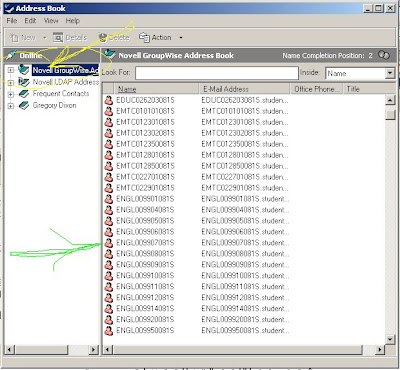 How to:
 And if you haven't used the pre-established class groups set up via Groupwise, go to the address book, make sure your are in the Novell groupwise address book - (See yellow arrow - note: not the frequent contacts where it might try and take you first) and at the top the classes start in alphabetical order by 4 letter abbreviation ( e.g. if you teach an English class and the class number were 00990**** - - you'd scroll to where we put the green arrow - ENGL00990*** and click).
Using this option maintains student privacy. Everyone gets the same message - but they don't see individual email addresses. Mail is sent to their KCKCC email account - Remind them to check that.
Lorenzetti, J.P. (2008) 14 ways faculty can improve online student retention.
Recruitment & Retention 22 (12)
 Look into the Accessories folder. Paste into a new project (hit control V - or go to edit and find Paste). Once in Paint, click on the pencil and open your colors palate.


 Posts
Posts

