Showing posts with label online. Show all posts

Thursday, March 5, 2009

Lectures: gone in 60 seconds

The Chronicle of Higher Ed. 3-6-9 has a fascinating FREE article on effective online lectures. Called "microlectures" the context discussed is community colleges. While some doubt that their topics can be boiled down, the article interviews a variety of deans and course designers who have been won over. IMHO, this may be because the format requires the teacher to break complex ideas down into more easily digestible chunks. Students love it.

NOTE: these microlectures should be combined with readings and activities that require them to explore the ideas.

The format encourages active learning. Read more.

The following extended quote is take from the article.

HOW TO CREATE A ONE-MINUTE LECTURE

David Penrose, a course designer for SunGard Higher Education who developed San Juan College's microlectures, suggests that it can be done in five steps:

1. List the key concepts you are trying to convey in the 60-minute lecture. That series of phrases will form the core of your microlecture.

2. Write a 15 to 30-second introduction and conclusion. They will provide context for your key concepts.

3. Record these three elements using a microphone and Web camera. (The college information-technology department can provide advice and facilities.) If you want to produce an audio-only lecture, no Webcam is necessary. The finished product should be 60 seconds to three minutes long.

4. Design an assignment to follow the lecture that will direct students to readings or activities that allow them to explore the key concepts. Combined with a written assignment, that should allow students to learn the material.

5. Upload the video and assignment to your course-management software.

Monday, September 22, 2008

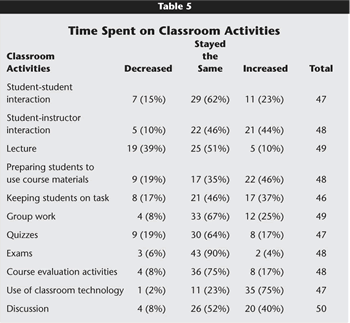
The Effect of Web-enhancement on Classes – Quantitative Research.

An article by Wingard (2004) ,
Classroom Teaching Changes in Web-Ehanced Courses,
"assessed the kinds of changes that occur in face-to-face instruction when faculty add Web enhancements to their course. "

It comes up with some expected and unexpected results. The affected faculty expected the following:
  • more efficient face-to-face interactions, better class discussions
  • more active learning,
  • less lecture
  • more readily available practice and feedback opportunities for students, and
  • more student-centered instruction.
That was essentially the case; moreover, “an unanticipated consequence of continual and comprehensive student access to course materials and resources was an elevation of faculty's expectations for students" [emphasis mine].

Where change was noted it was much more likely to be positive.

Source: Educause. Follow link in first sentence for full article.


Wednesday, September 10, 2008

Teachers Should have an Angel (online shell)

Angel is a place to put your stuff - online: a learning management system (LMS) also called a Course Management System (CMS). Here we use Angel mostly for fully online or distance learning, but other campuses provide an LMS for any class offered. You want to have Angel for an on-ground class, such as:
  • Copyright protection. Having content behind a password protected shell/firewall/ whatever, may keep the college from getting sued. Copyright law is ambiguous - sometimes intentionally so, and anyone can benefit from an added layer of protection. See Dr. Rosemary Talub’s Presentation from SIDLIT.
  • Students who transfer will have to use an LMS - Blackboard at KU, KSU Online at KSU or Moodle at Baker. They function similarly.
  • Students want it.
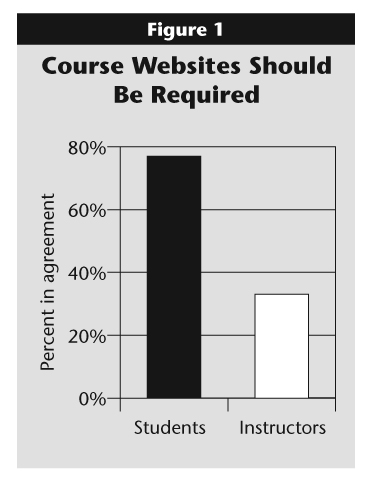
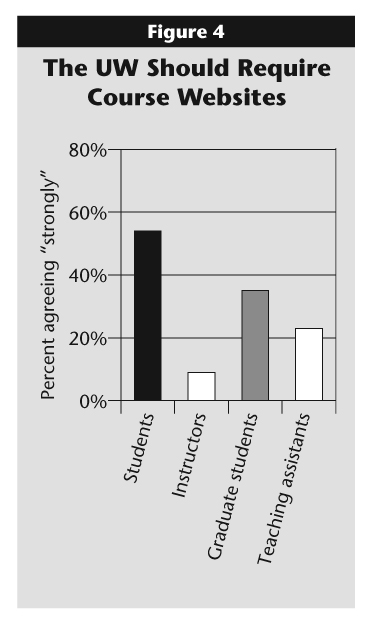
Students and faculty have widely and wildly different expectations. The embedded tables are from an Educause article which provided a meta-analysis of over 100 universities and community colleges. Our own Chan Tung published similar results.

Also, although the process may differ from department to department, it requires a) institutional approval b) at least a semester advance notice c) that you take a "course" online from OES - to learn the system and get the students' perspective.

Because instructors may not know what section of a course they will be teaching or if it will fill, it’s challenging to arrange to have web-enhancement, particularly for an adjunct.

What are other obstacles, resistance, do faculty have to web-enhancement?